
Typography
Introduction
Last updated: 22 January 2026, 14:44 by Xavier Bougouin
Typography refers to the application of text styles to create clear hierarchies, organise information, and guide users through a product.
Principles
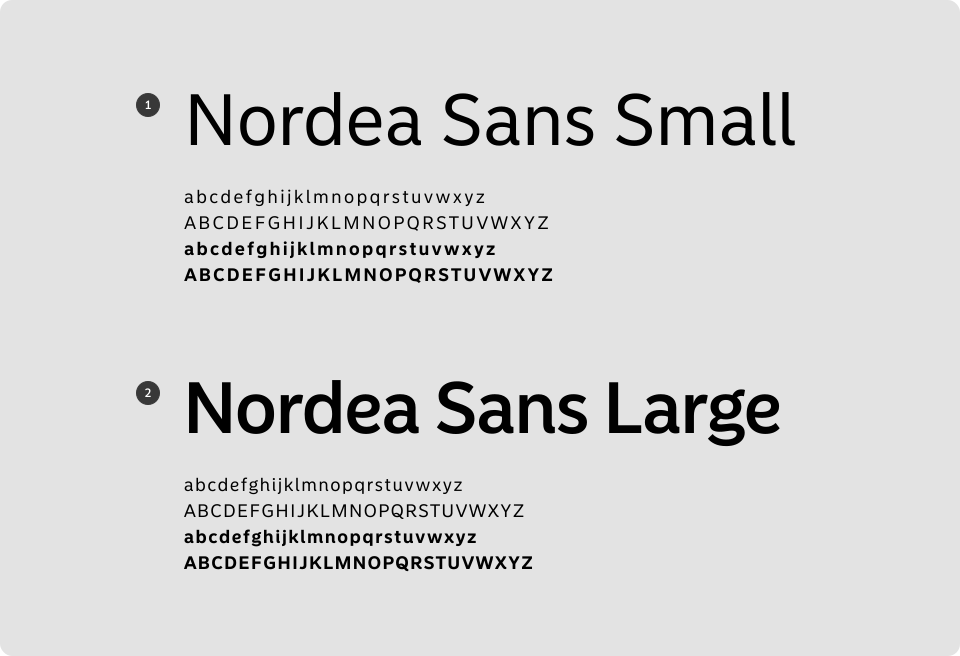
Nordea Sans Overview
Nordea Sans was created by Letters from Sweden under the guidance of Bold Scandinavia. It’s a modern sans-serif typeface with distinctive characteristics, designed for clarity and impact.
The typeface is divided into two subfamilies:
- Text – optimised for readability in body copy.
- Display – designed for headlines and larger sizes.
Nordea Sans is available in two formats:
- Nordea Sans Web – for digital use (websites, presentations such as PowerPoint or Keynote).
- Nordea Sans – for print materials.
Text Typeface: Nordea Sans Small
Nordea Sans Small is designed for legibility in long passages and performs well at smaller point sizes.
Use it for text displayed at 22px or smaller.
Display Typeface: Nordea Sans Large
Nordea Sans Large is a display typeface intended for headlines and large text sizes. Its accentuated curves and details give it a distinctive personality.
Use it for text 22px and above, optimised for web.
Text maximum width
- According to WCAG Success Criterion 1.4.8 Visual Presentation (Level AAA), lines of text should not exceed 80 characters. To be cautious, we will use 70 characters as the maximum width for text length.
- Implementation: Use CSS with relative units like ch (e.g., max-width: 70ch;). The line length should be relative to the character size.
- In CSS ‘ch’ is a unit of width measurement. The ‘ch’ unit in CSS is used to size elements based on the width of the “0” (zero) character of the font being used.
- Use a max-width of 700px (70ch) for 16px text and above
- Use a max-width of 630px (70ch) for 14px text
Clear Structure
- Align text left or centre, as most users read left to right.
- Keep sentences short and paragraphs concise.
- Set line height to at least 1.5× the font size, following Nordea Design System values.
- Apply clear writing techniques for logical structure and readability.
- Limit text block width to around 70 characters for optimal legibility.
Accessibility
- Ensure sufficient contrast between text and background.
- Use short sentences and avoid overly long paragraphs.
- Avoid using bold weights for small text sizes to maintain clarity.
Styles
Nordea Sans Small Regular
| Mobile | Web | Font Size | Line Height |
|---|---|---|---|
| NCCFont.MediumRegular | font-medium, regular | 14px/0.875rem | 20px/1.25rem |
| NCCFont.LargeRegular | font-large, regular | 16px/1rem | 24px/1.5rem |
| NCCFont.xLargeRegular | font-xlarge, regular | 18px/1.125rem | 26px/1.625rem |
Textual Link
| Mobile | Web | Font Size | Line Height |
|---|---|---|---|
| NCCFont.MediumRegular | font-medium, regular | 14px/0.875rem | 20px/1.25rem |
| NCCFont.LargeRegular | font-large, regular | 16px/1rem | 24px/1.5rem |
Nordea Sans Small Medium
| Mobile | Web | Font Size | Line Height |
|---|---|---|---|
| NCCFont.MediumRegular | font-medium, regular | 14px/0.875rem | 20px/1.25rem |
| NCCFont.LargeRegular | font-large, regular | 16px/1rem | 24px/1.5rem |
| NCCFont.xLargeRegular | font-xlarge, regular | 18px/1.125rem | 26px/1.625rem |
Nordea Sans Small Bold
| Mobile | Web | Font Size | Line Height |
|---|---|---|---|
| NCCFont.LargeBold | font-large, bold | 16px/1rem | 24px/1.5rem |
| NCCFont.xLargeBold | font-xlarge, bold | 18px/1.125rem | 26px/1.625rem |
Nordea Sans Large Bold
| Mobile | Web | Font Size | Line Height |
|---|---|---|---|
| NCCFont.xxLargeBold | font-xxlarge, bold | 22px/1.375rem | 30px/1.875rem |
| NCCFont.xxxLargeBold | font-xxxlarge, bold | 26px/1.75rem | 32px/2rem |
| NCCFont.xxxxLargeBold | font-xxxxlarge, bold | 30px/1.875rem | 36px/2.25rem |
| NCCFont.xxxxxLargeBold | font-xxxxxlarge, bold | 36px/2.25rem | 44px/2.75rem |
Guidelines to Follow
Apply typography principles effectively by following these guidelines:
Sources
- Nielsen Norman Group: Legibility, Readability, and Comprehension: Making Users Read Your Words
- Web Content Accessibility Guidelines (WCAG) 2.1: Success Criterion 1.4.12 Text Spacing
- Web Content Accessibility Guidelines (WCAG) 2.1: Success Criterion 1.4.3 Contrast (Minimum)